FAQs ON AV VOICE CHANGER SOFTWARE
Voice
changing software - Voice maker - Disguise voice - Imitate
voice
| Find answers to your questions
regarding Voice changing software download,
purchase, usages, plug-ins, and upgrades. |
| |
|
Tip of the day: go
to
http://babelfish.altavista.com/tr to translate
this content to other languages. |
 |
|
Voice Changer Software
is now available in 3 editions.
View
features and pricing comparison chart. |

 1-1. Why
should I buy the Full Version?
Back 1-1. Why
should I buy the Full Version?
Back
Unlike the limited Demo, the Full Version gives you a full
access to all features of AV Voice Changer Software so that
you can enjoy it without any limitation. With a license key,
you can:
- Choose any preset “nickvoice” from the nickvoice
library and be anyone that you want to be.
- Freely adjust the Pitch & Timbre as well as other settings
until getting the desired voice output.
- Record as long as possible.
- Apply and combine as many effects as possible to create
and save your own effect layouts to make your voice more
amazing.
- Add new voices of your buddy, sweetie, idol, etc. to the
sample voice list of the Voice Comparator to compare and
simulate.
- Fully control all functions of the program.
- Free download all add-on packages of nickvoices and
effects (owners of the Diamond edition only).
Especially, once making a purchase, you become our Value
Member, who will enjoy a full and lifetime technical support
for your software as well as many wonderful gifts and
benefits from Audio4fun Community.
1-2.
How do I pay for my order?
Back
A wide range of online and offline payment methods are
accepted at our store:
- Online Credit Card
- PayPal
- Fax
- Phone
- Check / Money Order
- Bank / Wire Transfer
1-3. Is
it secure to place an order online?
Back
Rest assured that we provide a secure online order
processing system that guarantees none of your personal
information will be shared with any other parties. We only
collect and keep these details for your own sake so that we
can support you in the future.
1-4.
How do I place an order?
Back
- Go to our order page at
http://www.1speechsoft.com/purchase.htm and choose your
favorite product.
- Click BUY NOW.
- The online
order page now comes up. Click Order Now at the
bottom.
- Fill out
all required information and choose a payment method.
- Press
Place Your Order at the end of the page and continue to
complete the purchase. As soon as your order is released,
the Full Version and a license key will be sent to you via
email at once.
1-5.
I don’t have a credit card. Can I pay in cash or by check?
Back
- Pick up the product that you wish
to buy at
http://www.1speechsoft.com/purchase.htm.
- Click BUY NOW.
- The online order page now comes up. Click Order
Now at the bottom.
-
Enter all necessary information
and select Check / Money Order as the payment method.
- Send the money or check to the provided address. As soon
as your money arrives, the order will be released, and the
Full Version will be emailed to you at once.
1-6.
How will the software be delivered? Is there any CD package?
Back
Delivery is mainly made via
download from the Internet. As soon as your purchase is
completed, the Full Version and a license key will be sent
to your mailbox. However, a CD package is also available
with an additional $12.50. If you would like to receive a
hard copy of the software, check the "Get it on CD"
option on the order page.
Yet, it is not compulsory to purchase the CD. Because we
always work hard to improve our products, new versions will
be periodically released with fixed bugs and added features.
Therefore, the CD will be soon out of date, and download
from the Internet is recommended to keep your software
fresh. Do not worry about having no backup of the program.
Whenever you need to reinstall it or have any problems,
simply contact us at
support@audio4fun.com.We will be right at your service.
1-7.
How long will it take me to successfully set up the program
on my computer?
Back
Your payment method decides how
long your order will be processed. Online Credit Card is
recommended because this is the fastest and most convenient
way to get a product. If there is no problem with your
credit card, and if you have a broadband connection, it will
take only 15 minutes for the order to be completed and for
you to install the software onto your PC. However, now and
then it may take more time due to a few extra procedures of
our retailer. If this is the case, your order will be
pending and will be processed within about one business day.
1-8.
I have ordered the Full Version but received no confirmation
email.
Back
Normally, after completing the ordering process, you will
see an order confirmation right on the web page, and in a
minute instruction emails will be delivered to your mailbox.
If you receive no email confirmation, it is possible that:
- You have mistyped the email address.
- Your account has a fatal error and won't receive new
mails.
- Our emails have been blocked by your spam filter.
- Our emails have gone to your Bulk mail folder.
In this case, please do not hesitate to
contact us.
Remember to provide a valid alternate email address where we
can reach you.
1-9.
How can I
claim a refund and get my money back?
Back
Our refund policy guarantees that you can get your whole
money back within 30 days from the date of purchase. Below
is our refund policy:
Full refund will be processed in the following
cases:
- If you accidentally bought the software more than once.
- When your credit card was used to place the order without
your permission.
- When your problems in using our products remain unsolved
after you have followed exactly our instructions.
- When you stably encounter an error which is preventing you
from using our software properly, and if we are not able to
correct the error within an acceptable period of time.
NOTE: In this case, the refund is only made after we
receive detailed information about your error, requested by
our support staff, such as screenshots of error messages,
log files, detailed descriptions of your actions, file
samples, etc.
Refund request will be declined in the following
cases:
- When the refund request reaches us beyond 30 days after
the date of purchase.
- When you do not reply our email and confirm your request
within the 14 days from the first day you claim for the
refund.
- When you demand a refund immediately after buying the
software.
- When you inform us about changing your decision to buy the
software, saying you has uninstalled it and is not going to
use it without giving any particular reasons.
- When reasons which prevent you from proper using of our
software are stated clearly on our official site. (For
example, if you request a refund due to the absence of
features which we never claimed to provide and which are not
listed in the feature list for our software).
- If your configuration does not meet our recommended system
requirement that stated in our FAQ 1-10 (i.e. our software
does not support your hardware or Operating System, e.g.
Macintosh, Windows XP 64-bit, or external CD/DVD writer).
Therefore, it is strongly recommended that you read our FAQ
pages carefully before making the purchase.
1-10.
What is the recommended system requirements for AV Voice
Changer Software?
Back
- Windows 98/Me/NT/2000/XP operating system.
- Full-duplex soundcard.
- 500 MHz compatible processor. (1 GHz processor is
recommended for VCS DIAMOND)
- Microphone and headphones (speakers).
- 100 MB hard disc space.
Please notice that this software supports neither Windows
XP 64-bit nor OS X of Macintosh.
QUESTIONS ABOUT EDITIONS OF
VCS
2-1. How
does VCS GOLD differ from VCS?
Back
VCS GOLD includes the whole VCS
package but features more special functions as follows:
- Advanced Recorder supports 9 audio formats, including
compression ones – MP3, WMA, OGG just to name a few.
- Auto Recorder helps record voice and audio automatically
with the highest quality.
- Ignore Filters allows you to select any sound stream or
application to exclude from the morphing process.
- Audio Player can play 12 common sound formats and let you
keep the music on while chatting.
- More nickvoices are now available.
- More celebvoices are added for you to compare and
simulate.
2-2. What
are the outstanding features of VCS DIAMOND?
Back
Besides the full features of VCS
GOLD, VCS DIAMOND offers more outstanding tools, such as:
- Advanced Pitch & Timbre with faster algorithms alters
your voice input into hundreds of more natural and real-time
voice outputs.
- A huge library of nickvoices and effects is added to
guarantee your comfort and satisfaction in voice morphing
and music processing.
- Frequency Morpher allows modifying voice in a definite
range.
- Voice Equalizer and Sound Quality help improve the quality
of voice output.
- Nickvoice Rules allows you to set some specific rules for
using nickvoices along with different applications.
- Owners of VCS DIAMOND can access free downloads of all
Add-on Packages including up to 70 nickvoices and 250
effects.
2-3. I
have purchased VCS (or VCS GOLD). Will I get any special
offer to buy the higher editions?
Back
- VCS customers are offered a
special $20 coupon to upgrade their voice changer to VCS
GOLD.
- VCS GOLD customers are offered a special $45 coupon to
upgrade their voice changer to VCS DIAMOND.
QUESTIONS ABOUT INSTALLATION
3-1. What
is the Protection Number? Where can I find it?
Back
Protection Number is a security
number unique on each computer. Once you have bought a
license of VCS, Protection Number is combined with your
registered name and email address to generate a key for you
to install the Full Version. Therefore, it is essential that
your Protection Number be provided correctly so that the
Serial Number can be accepted upon installation.
3-2. Why
can’t I install VCS on another computer?
Back
Due to
security reasons and our End-User License Agreement, the
Serial Number that you receive from us can only be used on
01 computer bearing the corresponding Protection Number.
Yet, we are always willing to produce one more license key
for customers having 02 computers so that they can fully
enjoy the software. Thus, please let us know if you would
like to install VCS on your second PC.
If you want to set up VCS on 03 computers or more, please
place one more order. Depending on the number of licenses
you need, we will offer you a suitable discount.
3-3. Can
I use the original license key to reinstall VCS?
Back
Normally, the Protection Number will stay the same no matter
how many times you reformat the computer. So you can use the
original license key to reinstall VCS.
However, the Protection Number will change when you have
a new computer, replace your mainboard, or when the BIOS
information is updated. Please do not worry. Whenever you
need help, simply let us know so that we can support you.
3-4. Despite
copying and pasting exactly all information provided in the
instruction email, I can’t complete the installation because
of the error “Please re-enter correctly the information…”:
Back
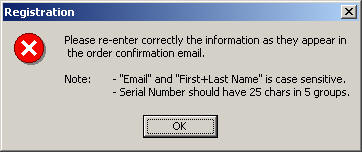
If you provide a wrong Protection Number,
the Serial Number will be created incorrectly and can not
complete the installation. Regarding your problem, please
try again as follows:
- Download the "vcs_protection_number.exe" file from
here and open it to find the correct Protection Number
of your computer.
- Copy exactly and send us this number so that we can
generate a correct key for you to activate the Full Version.
3-5. I
can’t activate the installation due to the error “Could not
initialize installation. File size expected = 1416160, size
returned = 229376."?
Back
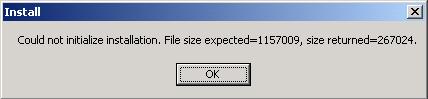
Because your download is interrupted due to a network
problem, the file size is not enough for installation to be
activated. So please try again to download the setup file.
During the download, remember to close all other running
applications (even instant messengers) to optimize the
process and avoid download interruption.
3-6. When
I installed Demo version, I was confused by the Free Key
form
Back
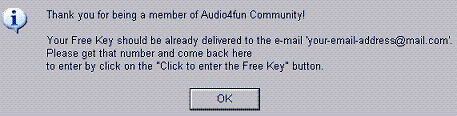
The Free Key ensures you to take more
advantages of the Demo Version. The Form will keep coming up
each time you turn on the Demo until you already register
for a Free Key. The message box below will appear each time
you click the button "Click to subscribe" but only one
e-mail is delivered since then.
If you do not receive your e-mail with Free Key, please
check your Bulk folder for it. Otherwise, please feel free
to contact our
support team for help.
3-7. I
can’t install VCS because of the error: "You do not have
access to make the required system configuration
modifications."?
Back

Regarding this problem, simply restart your computer and
install the software again. However, it is recommended that
you download the latest
version of VCS for a better performance.
QUESTIONS ABOUT USAGE AND PROBLEMS
4-1.
How do I use VCS in voice chat?
Back
Rest
assured that VCS is compatible with most instant messengers,
such as Yahoo! Messenger, AOL Messenger, MSN Messenger,
Skype, Eyeball Chat, etc.
First, open VCS, choose a nickvoice or adjust the Pitch &
Timbre as well as other features till getting the desired
result. Activate voice chat, your original voice from
microphone will be disguised immediately into a new one of
your preference.
4-2.
Can I use VCS to change my voice on the phone?
Back
The
program is extremely easy to use and can work fine with
Internet phone applications, such as Net2Phone, Ring-voiz,
SkypeOut, etc. that offer you the ability to call right from
your PC to any regular phone, both local and international
with much cheaper rates. Simply turn on VCS, pick up a
nickvoice. Then make a call, the person at the other end
will hear your changed voice at once. Currently, VCS does
not have landline telephone and mobile phone versions.
4-3.
How about using VCS with gaming chat applications?
Back
You can also use VCS to disguise
your voice in popular gaming chat programs, such as Ventrilo,
Teamspeak and Roger Wilco.
4-4.
How do I modify songs and audio clips with VCS?
Back
Play your sound files in an
audio player, such as Windows Media Player, RealOne, Winamp,
etc. and turn on VCS. The software can change vocals, apply
effects as well as record and save the morphed stream into a
brand-new file for your own purposes.
4-5.
I want to sing karaoke with different voices. Is this
possible with VCS?
Back
Very simple, turn VCS on, set
the timbre and pitch to the desired levels, turn "Duplex"
button on, sing along the running lyrics to microphone. VCS
can work with PC Karaoke Players without modifying the Midi
music. You can also use VCS with a regular karaoke device if
your PC Line-out is connected to it.
4-6.
Can I listen to unchanged music while morphing my voice in
voice chat?
Back
Yes, you can. VCS can hook many sound streams but process
only one at a time. When you play music and chat
simultaneously, VCS will intercept voice chat stream so that
you can chat with a changed voice and record the voice chat
conversation without morphing music playing from audio
players. Especially, VCS GOLD and VCS DIAMOND offer an
advanced built-in audio player right at hand for you to
enjoy your songs any time you like.
4-7.
How do I record and save the changed voice?
Back
Open VCS, pick up a nickvoice or manually adjust the
Pitch & Timbre and other features to the desired levels.
Activate VCS Recorder. Speak to the microphone, play a song,
or enter a voice chat, then press the Record button to
record and save the morphed voice. When finished, press the
Stop button, the recorded file is now available for your
later use.
4-8.
The voice output is accompanied by echo and feedback. How do
I fix it?
Back
Probably you have your speakers placed too close to the
microphone. Increase this distance and turn them to another
direction. Anyway, using headphones is highly recommended
for a better voice output. If the echo still persists, open
the Volume Control (the small speaker icon at the
right corner of your taskbar), click Advanced under
Microphone and uncheck the box "1+20dB Gain" or "Mic
Boost".
4-9.
I hear lots of background noise when running VCS? How do I
avoid it?
Back
Open the Volume Control (the small speaker icon at
the right corner of your taskbar) > click Options
menu > Properties > check “Recording” and all
the recording controls in the list > OK > the
Recording Control comes up > select Microphone
and drag its volume down till all noise disappears.
VCS DIAMOND users can also use Noise Reduction in
the Sound Quality module to reduce extra noise.
4-10.
How do I achieve a natural voice with VCS?
Back
Follow these tips to have a better voice output with VCS:
- Set the Advanced Tune close to 0.
- Do not adjust all Equalizer bands too high. You can use
the presets or manually combine all bands. Try this way:
Drag the sliders down and gradually raise them up till
getting the best combination. The five left bands are bass
frequencies, and the right are trebles. Add more bass to
have a warmer voice and more treble to have a high-pitched
voice.
- VCS DIAMOND users can use the Frequency Morpher, Voice
Equalizer and Sound Quality to get a better result.
- Do not open many applications while VCS is in use.
4-11.
It is annoying that my original voice is heard along with
the changed voice.
Back
Open the Volume Control (the small speaker icon at
the right corner of your taskbar) and check the MUTE
box under Microphone. By this way, your original voice will
be muted, and you will hear only one voice output – the
altered voice.
4-12.
Can I save a voice setting for later use?
Back
Yes, you can. After adjusting all parameters, such as
Pitch & Timbre, Advanced Tune, Effects, Frequency Morpher,
etc., you find that this setting can produce a favorite
voice and would like to save it for later use. Click on the
Nickvoices button and choose Save, define a
name for this nickvoice file and save it. Later, whenever
you wish to apply this setting, click the Nickvoice
button and choose Load to open and load these
adjustments to VCS panel.
4-13.
When I morph songs, the vocals are changed fine, but the
music is broken badly.
Back
Simply adjust the Advanced Tune close to 0, and
the problem will be fixed at once.
4-14.
Recorded files sound nothing like what I have modified.
Back
Remember to turn off VCS when playing back your recorded
files. Otherwise, they will be morphed one more time, and
the quality will not be the same as set.
4-15.
How do I save recorded files in MP3 as well as in other
formats?
Back
Only VCS GOLD and VCS DIAMOND offer this feature.
Just open VCS, click the Recorder button > VCS
Recorder comes up > Click Settings > Encoders
tab > define a suitable stream to process and right click on
this stream > select "MPEG-1 Audio" for MP3 format
and “Microsoft PCM Converter” for WAV format. If you
are not sure what stream will be processed, just right click
on all of them, one by one, and choose a desired codec.
4-16.
How do I set AutoRecorder for a certain application?
Back
This function is only available in VCS GOLD and VCS
DIAMOND.
Click the Recorder button > VCS Recorder comes up
> click Settings > Autostart > check "Turn
autostart recording" > choose "Autostart for custom
applications" > click the Add button and add some
applications that you wish to auto-record to the list >
Apply > OK.
4-17.
I want to exclude some audio streams and applications from
the morphing process. Is this possible?
Back
This function is only available in VCS GOLD and VCS DIAMOND.
Click the Settings button on VCS interface >
Ignore Filter > check "Enable" > if you want AV
VCS to ignore streams, check the Streams box and
select a stream in the list; if you want AV VCS to ignore
applications, check the Applications box and Add
the applications that you want to exclude from the morphing
process > Apply > OK.
4-18.
How do I set a Nickvoice Rule for an application?
Back
This feature is only available in VCS DIAMOND.
Click Settings on AV VCS interface > press the
Nickvoice Rules tab > check "Enable" > click the
Add button to create a rule > a dialog comes up >
type a Name for the rule > select a Nickvoice
and an Application for the current rule > OK >
the rule is now added to the list > click Apply and
then OK to apply this rule.
4-19.
How do I compare and simulate voices with VCS?
Back
- Open the Voice Comparator by clicking Comparator
on the main panel.
- Turn the DUPLEX mode OFF by clicking the DUPLEX button on
the main panel (if you work under Win2000 or win98, turn off
AV VCS as well).
- Select a celebvoice from the list and click the Play
button to listen to his/her voice (the spoken phrase will be
displayed in the phrase indicator).
- Click the Record button and repeat to the
microphone the exact phrase with the similar tempo,
intonation and pauses between the words.
- When the recording is finished, your voice will be
automatically compared to the selected voice. Click the
Auto button to start morphing.
- After your voice is morphed, click the OK button
and all morphed voice parameters will be transferred to VCS
main panel.
- Now you may turn the DUPLEX mode on and use the new
settings of your morphed voice.
Note: Try to imitate the voice of the selected
person (tempo, intonation, pitch, pauses between the words,
etc.) as much as possible. The words linked with underline
symbols do not have pauses between each other. When you
record your voice, do not make pauses between these words
either.
4-20.
What does the DUPLEX button stand for?
Back
The Duplex button has 2 modes: ON and OFF. When the
Duplex is ON, you can hear your changed voice output. When
Duplex button is OFF, your changed voice is muted. However,
when voice chatting or making Internet phone, rest assured
that the person at the other end will always hear your
disguised voice whether the Duplex button is turned on or
off.
Note: The Duplex button is in OFF status as default when
you use VCS with an audio player, such as Windows Media
Player, Winamp, RealOne, etc.
4-21.
The interface doesn't show up on my desktop. Instead, VCS is
stuck in the taskbar. How do I fix this?
Back
Regarding this problem, please do as follows:
- Press Alt + Space Bar + M (the key M stands for
"Move").
- Use the arrow keys
(←,↑,→,↓)
to move VCS into the desktop. You will see the frame
lines of VCS interface.
- Left mouse and the program will be back on your desktop.
Note: Do not open many applications when VCS is in
use.
4-22.
As soon as I turn on VCS, my Yahoo! Messenger stops working.
Back
You must be using an old version of VCS. Go to the
download page and upgrade your voice changer to the latest
version. Also, you may contact our Support Team for further
assistance.
4-23.
Where can I download plug-in packages for my VCS?
Back
Go to our Smart Update page at
http://www.audio4fun.com/smartupdates.htm to download
plug-ins for your VCS and have more fun. At present, 70
nickvoices and 250 effects are available. Also, many skins
are waiting for you to download and create a new look for
your VCS.
4-24.
Why can’t I select any “nickvoice” in the Demo Version? How
can I evaluate the software?
Back
The Demo demonstrates how your voice gets changed by
automatically rotating the preset nickvoices every 60
seconds. After 14 days, if you haven't registered for a Free
Key, your Demo will not alter voices anymore, and the Pitch
& Timbre will freeze at 100%.
While running the Demo, just speak to the microphone or
play music and see how the voice is changed. For a better
voice output, adjust the Advanced Tune close to 0 and do not
set all equalizer bands too high.
|


















 Power
Text to Speech Reader 2.31 Released
Power
Text to Speech Reader 2.31 Released

 Contract
us
Contract
us